


Messages: Text SMS Home App
3.5157.00 Reviews
App Specs
- Version
- 1.39
- Updated On
- License
- Free
- Downloads
- 1,000,000+
- Developer
- Color Delight Studio
- Categories
- Communication
- Platform
- Android
Screenshots
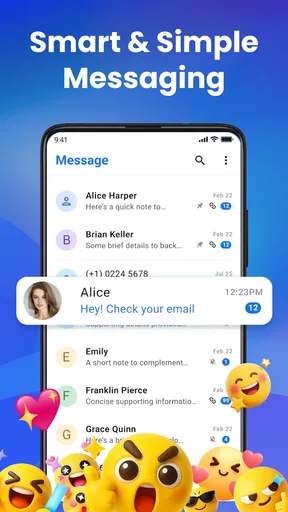
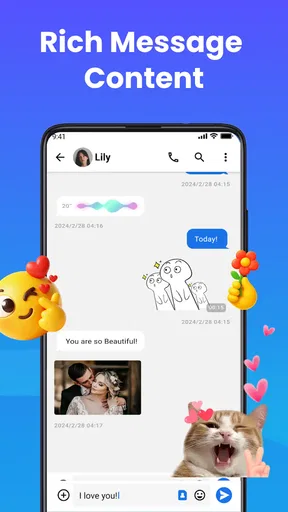
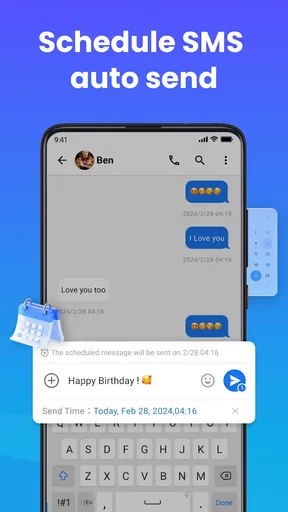
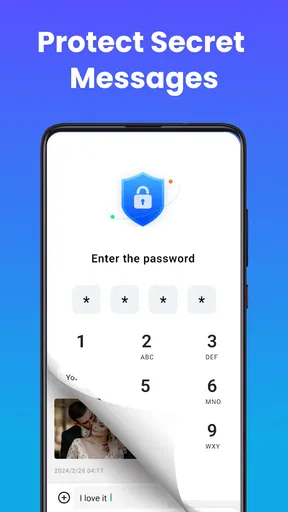
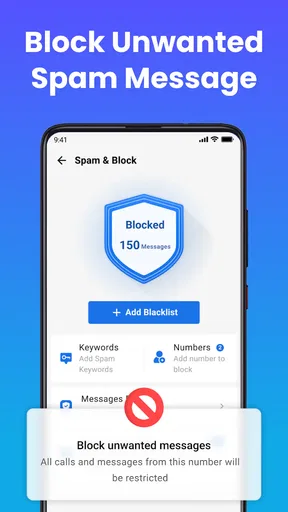
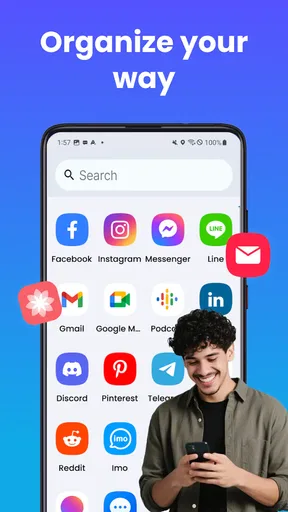
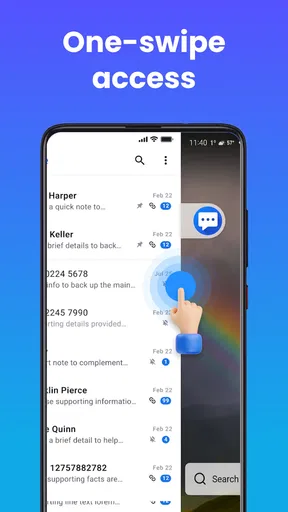
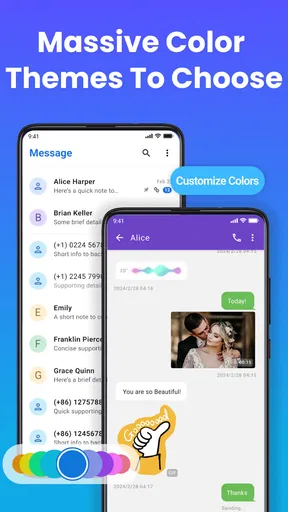
 Analysis by AppCompare
My first question with any texting app is whether it makes everyday communication feel clearer or simply gives me another place to check. Messages: Text SMS Home App is an Android communication app from Color Delight Studio that presents texting alongside a home-launcher role. That combination is worth considering if you like a more customizable phone experience, but I would first check that a new messaging app fits the way you already handle conversations, rather than assuming a different look will automatically make you more organized.
When a different texting setup makes sense
Text messages often sit between quick coordination and conversations that deserve a thoughtful reply. I find a dedicated SMS app most useful when I want routine exchanges—confirming a pickup, sharing an address, or checking a change of plans—to stay easy to spot without letting every incoming message dictate my attention. A new interface can help make texting feel more personal, but it cannot decide which conversations deserve an immediate response. That distinction matters with an app whose appeal includes both messages and launcher customization.
A realistic use case is a busy day when a family member sends a practical question while friends are planning an evening out. I might want to answer the time-sensitive question promptly, then leave the social chat until I have a break. The helpful habit is to use any visual organization or personalization to make the inbox comfortable to return to, not to treat every new message as a demand. If you currently miss important texts because they blend into a crowded phone setup, trying a different SMS experience may be worthwhile; if your problem is checking your phone too often, a new app by itself may not solve it.
How it fits beside familiar alternatives
Compared with the messaging app already on an Android phone, the main reason to consider this one is the promise of a different presentation and a home-launcher angle, rather than a fundamentally different kind of communication. For plain SMS, the built-in option may remain the simpler choice: it is already part of your routine, and changing apps can mean relearning where familiar controls live. I would switch only if the new setup feels easier to use or more inviting after actual daily use.
It is also important to distinguish SMS from internet-based chat services. A conventional SMS app is for text messaging through the phone’s messaging setup; it should not be assumed to offer the same cross-platform chat experience, availability, or conversation continuity as a dedicated online messenger. If most of your friends and family coordinate in another service, replacing it with an SMS app will not necessarily bring those conversations together. Think about where the people you need to reach already are before making this your default.
The app is free to install, while optional in-app purchases range from $9 to $120 per item. I would treat those purchases as a reason to inspect the available choices carefully, not as something needed to begin evaluating whether the basic experience suits you. Its Everyone age rating may make it broadly accessible, but that does not remove the need to make sensible decisions about who can see or use your phone.
A practical way to test it without disrupting your routine
Rather than moving every conversation over and judging the app in a few minutes, I would test it in stages. First, look at the main texting screen and see whether it makes recent conversations easier to scan. Then try the actions you use most, such as opening an existing thread and composing a short reply. Finally, consider whether the launcher side adds genuine convenience or merely changes the appearance of your home screen. This small trial helps separate useful workflow improvements from decoration.
Worth Reading Before You Choose

EA SPORTS FC Mobile 26 Is a Bigger Football Game, but It Takes Time

Flipboard Shows What News Apps Must Do Beyond the Feed

Switching to Android Auto Means Rethinking Your Driving Routine

Google Calendar Makes a Crowded Week Easier to Manage

Ludo King Makes the Most of the Minutes Between Plans

Baby Panda World Brings Quick Play to Modern Phones, but Its Game Library Feels Busy
One non-obvious trade-off is that customization can make an app feel more welcoming while also making familiar actions less familiar. If you change the visual setup, keep it simple at first; a restrained layout makes it easier to notice whether the app itself improves your routine. Another useful check is to try the same task you often perform under time pressure, such as finding an earlier message with an address. A design that looks attractive but slows down that practical task may not be the right fit.
I would also avoid changing your default messaging app at a moment when you rely on uninterrupted communication. Make the switch when you have a little time to inspect how conversations appear and how the new app behaves in your normal routine. If anything feels confusing, you can decide whether to keep exploring or return to the app you already know. This is especially sensible for people who use SMS for essential coordination and do not want to learn a new interface in the middle of a hectic day.
Getting Started with Messages: Text SMS Home App
The first thing I noticed about the Messages: Text SMS Home App is its intuitive interface. Downloading and setting it up was a breeze. As soon as I opened it, I felt like I was in familiar territory, even though it was my first time using it. The app is designed to make texting feel like second nature, and trust me, it delivers.
One of the standout features is the seamless syncing across devices. I mean, who doesn't love being able to pick up a conversation on their tablet that they started on their phone? It's like having a conversation that follows you around, in the best way possible.
Features That Stand Out
Now, let's talk features. The app doesn't just stop at being a regular texting app. It's packed with bells and whistles that make communication more engaging and fun. For starters, there's a wide range of emojis and stickers. If you're like me and love to express yourself beyond words, you'll find this feature a game changer.
Another feature I found super handy is the message scheduling. How many times have you remembered to send a happy birthday text at 3 AM and then forgotten by morning? With this app, you can draft your message and schedule it to send exactly when you want. It's like having a personal assistant for your messages.
Plus, there's the group chat feature, which is perfect for keeping everyone in the loop without having to send multiple individual messages. I found this especially useful for planning events or just keeping up with friends and family.
Design and Usability
The design of the app is sleek and modern. It's not cluttered, which I appreciate. The developers clearly put thought into how users interact with the app. Navigating through the app is a smooth ride. Everything is where you expect it to be, and the learning curve is practically nonexistent.
Customization is another strong suit of this app. You can tweak the theme to suit your mood or personality. I had a lot of fun playing around with different color schemes and backgrounds. Who knew texting could be this personalized?
Security and Privacy
In today's digital age, security is a big concern, and rightly so. With the Messages: Text SMS Home App, you get end-to-end encryption for your messages. This means your conversations are just between you and the recipient, adding an extra layer of peace of mind.
The app also offers features like passcode locking, so even if someone gets hold of your device, they won't be able to access your messages without the code. It's these little details that make a big difference.
Final Thoughts
All in all, the Messages: Text SMS Home App has been a delightful addition to my digital toolkit. It's not just another messaging app; it's a comprehensive communication platform. Whether you're a texting novice or a seasoned pro, you'll find something to love about this app.
So, if you're looking for a fresh, efficient way to handle your text messages, give this app a go. It's easy to download, simple to set up, and packed with features that make communication genuinely enjoyable.
Ready to transform your texting experience? You know where to find the download link. Happy texting!
What to weigh before making it your everyday app
There are a few practical questions I would answer before relying on any alternative SMS app. First, does it support the phone and operating system you plan to use it on? Messages: Text SMS Home App is listed for Android with a minimum OS requirement of 10, so it is not a choice for someone using an iPhone. Second, do you want an SMS-focused tool, or are you looking for one shared place for internet chats and texts? Those needs are different, and choosing the wrong kind of app can add friction rather than reduce it.
The app’s current version is 1.39. Its average rating is 3.6 from around 2.9 thousand ratings, with 78 written reviews, and it has over one million installs. I read those figures as a reason to approach it with measured expectations: it has attracted a substantial audience, but the rating is not a guarantee that its workflow will suit every device or habit. I would pay more attention to whether its interface and day-to-day behavior work for me than to popularity alone.
The most useful test is not whether the app offers a long menu of options, but whether it reduces small points of confusion. Can I tell which conversation needs a reply? Can I find the message I need without interrupting whatever I was doing? Do the home-screen choices make the phone more comfortable to navigate, or do they create another layer to maintain? Asking those questions keeps the decision grounded in actual use, rather than novelty.
Who is likely to enjoy the change
I can see this app appealing to someone who sends SMS regularly, enjoys personalizing the look of a phone, and is comfortable trying a different interface. It may also suit a person who wants scheduling to support considerate timing: writing a message when it comes to mind, then arranging for it to arrive at a more appropriate hour. That can help with birthday wishes or a reminder you do not want to send late at night. The important point is to use scheduling as a convenience, not as a substitute for checking that a message is still timely before it goes out.
Group messaging can also help when a small plan involves people who need the same practical details. I would use a group thread for the time and location, then keep any personal follow-up in a separate conversation. That avoids making the group chat carry every side discussion and makes the useful information easier to find later. Stickers and emojis can add warmth, but for logistics I would keep the key details in plain language so nobody has to interpret a reaction as an answer.
On the other hand, I would skip it if the built-in SMS app already feels fast and dependable, if your main conversations happen in internet messengers, or if you are trying to reduce the number of things that compete for your attention. People who prefer a minimal home screen may also see the launcher aspect as unnecessary. There is no advantage in changing a familiar setup simply because another one offers more ways to alter its appearance.
Keeping communication at a healthier pace
A different texting interface can shape how often I notice messages, but it cannot set boundaries for me. I would decide in advance when I want to check routine conversations and when I am available for urgent replies. For non-urgent plans, a scheduled message can make my own timing more deliberate; for a sensitive conversation, a scheduled send may feel impersonal or become outdated, so I would write and send it when I can give the exchange proper attention.
It is equally important not to mistake a privacy feature for a complete privacy strategy. The published article describes encryption and passcode locking, but I would still be careful about leaving a device accessible to other people and about what I choose to put in a text. A lock can help protect access on the device; it does not change the social consequences of sending a message to the wrong person or sharing information in a conversation where it does not belong.
There is a similar distinction with syncing: being able to continue a conversation on another device sounds convenient, but it is useful only if the devices you use are part of a compatible setup and the behavior works as you expect. I would test that with an ordinary, non-urgent exchange before depending on it for anything important. If your communication needs are mostly phone-based, a claimed multi-device convenience may matter less than quick access and a dependable daily routine.
My verdict on Messages: Text SMS Home App
Messages: Text SMS Home App is best approached as a customizable SMS option for Android users, not as an automatic replacement for every chat service or a guaranteed cure for distraction. Color Delight Studio released it on October 3, 2024, and its Everyone age rating makes it broadly suitable in content terms. The free starting point makes trying it accessible, while the range of optional purchases is worth keeping in mind if you are deciding how much to spend on personalization or other extras.
For me, the deciding factor would be whether the app makes ordinary texting more comfortable without making it harder to stay focused. Try a few real tasks, including finding an old detail and handling a group plan, before settling into it. If the visual choices and message workflow help you communicate with more clarity, it may be a pleasant fit. If you mainly want fewer interruptions, prefer your phone’s existing setup, or rely on a different chat platform, keeping your current tools may be the more sensible choice.
Pros
- Intuitive user interface for easy navigation.
- Supports multimedia attachments seamlessly.
- Customizable themes and layouts.
- Efficient battery usage for longer chats.
- Quick reply feature enhances productivity.
Cons
- Limited integration with third-party apps.
- Occasional delays in message delivery.
- Lacks advanced search functionalities.
- No built-in encryption for messages.
- Ads can be intrusive at times.
FAQs for Messages: Text SMS Home App
What features does the Messages: Text SMS Home App offer?
The Messages: Text SMS Home App provides a comprehensive messaging platform that includes SMS and MMS capabilities, customizable themes, group messaging, and quick reply options. It also supports rich media sharing, such as images, videos, and voice messages, ensuring a versatile communication experience.
Is the Messages: Text SMS Home App secure to use?
Yes, the app places a strong emphasis on user privacy and security. It offers end-to-end encryption for messages, ensuring that your conversations remain private. The app also supports secure logins and does not share your data with third-party entities without consent.
Can I customize the appearance of my messages in the app?
Absolutely! The Messages: Text SMS Home App allows users to personalize their messaging interface with a variety of themes, colors, and font styles. You can customize chat bubbles, backgrounds, and even set personalized notification tones for different contacts.
Does the app support sending messages to international numbers?
Yes, the Messages: Text SMS Home App supports international messaging, allowing you to send SMS and MMS to numbers worldwide. However, it’s important to check with your mobile carrier regarding any additional charges that may apply for international messaging.
Is the Messages: Text SMS Home App free to use?
The app is free to download and use, offering a range of features without any cost. However, it may include in-app purchases for additional themes or premium features. Regular SMS and MMS charges from your carrier still apply for sent messages.


